


🌞 Gamification Across the Hub
Actions inside the Hub earns Sunshine points:
- Watching live shows
- Joining Villa Live
- Hosting Villa Owner Live
- Submitting ‘Lets Plan Your Trip’
- Making offers
- Accepting offers
- Booking villas
- Participating in Lounge polls
- Completing challenges
Achievements unlock across all features, feeding into your Sunshine Rank.
The Hub becomes your personal adventure progress tracker.
🎢 INTERACTIVE MAP COPY
Tooltips, Hover Text & Micro‑Labels
Below is the complete set of copy you can plug directly into your interactive map system.
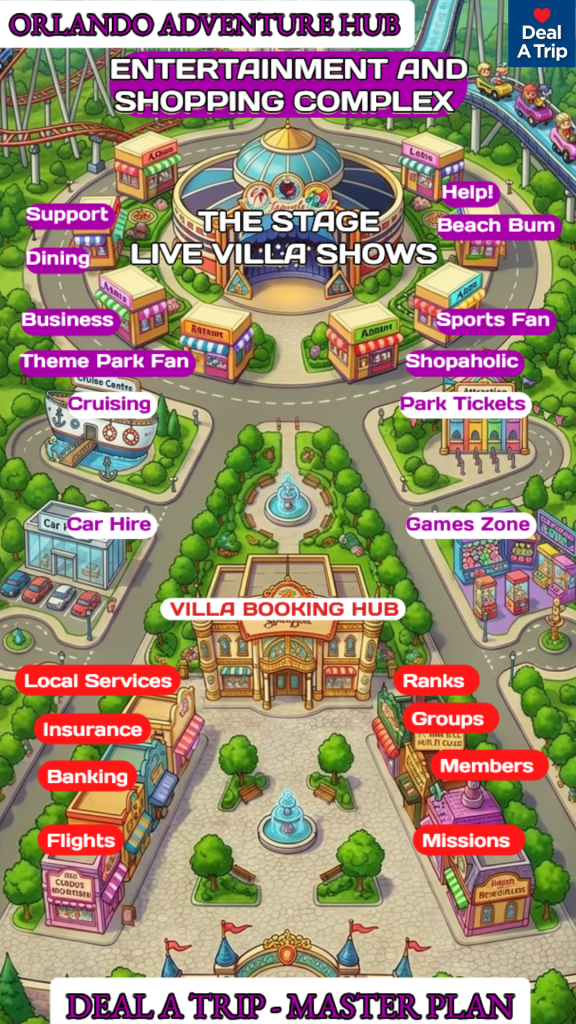
🎭 THE STAGE — ENTERTAINMENT HUB
The Stage (Main Building)
Tooltip: Step inside the home of our live shows, video tours, and interactive experiences.
Hover Text: Welcome to The Stage — where the spotlight never fades.
🎬 SHOWTIME LINEUP (Inside The Stage)
Villa Live
Tooltip: Join Kym in the studio and Caroline live from Orlando for real‑time villa adventures.
Hover Text: It’s happening now — go live with us.
Villa Showcase
Tooltip: Explore beautifully filmed video tours of Orlando’s most exciting rental properties.
Hover Text: Step inside — the tour is about to begin.
The Lounge
Tooltip: Relax with our mid‑week variety show full of stories, tips, and Orlando rental fun.
Hover Text: Take a seat — the conversation is just getting started.
Take It or Leave It
Tooltip: Pitch a Rental Bid and see if you can secure your ideal price.
Hover Text: Your offer. Your choice. Your villa.
🏰 THEME PARK DISTRICT
Theme Park Fan
Tooltip: Your gateway to Orlando’s biggest attractions, tips, and insider guides.
Hover Text: Thrills, shows, and magic await.
Park Tickets
Tooltip: Find the best ticket options for Orlando’s world‑famous theme parks.
Hover Text: Your adventure starts here.
🍽️ DINING & SHOPPING
Dining
Tooltip: Discover restaurants, food spots, and local favourites across Orlando.
Hover Text: Hungry? Let’s explore.
Shopaholic
Tooltip: Find the best shopping districts, outlets, and hidden retail gems.
Hover Text: Retail therapy begins here.
🏖️ LIFESTYLE ZONES
Beach Bum
Tooltip: Explore Florida’s best beaches, coastal escapes, and day‑trip ideas.
Hover Text: Sun, sand, and sea — let’s go.
Sports Fan
Tooltip: Catch the latest sports events, venues, and Orlando fan experiences.
Hover Text: Game on.
🛟 SUPPORT & HELP
Support
Tooltip: Need assistance? We’re here to help with anything you need.
Hover Text: How can we help today?
Help!
Tooltip: Quick answers, guides, and support for your trip or booking.
Hover Text: Let’s solve it together.
🚢 TRAVEL SERVICES
Cruise Centre
Tooltip: Explore cruise options, ports, and packages from Orlando.
Hover Text: Set sail on your next adventure.
Car Hire
Tooltip: Find the best car rental options for your Orlando stay.
Hover Text: Your ride is ready.
🏡 VILLA BOOKING HUB (Central Plaza)
Villa Booking Hub
Tooltip: Your central destination for finding, comparing, and booking Orlando rentals.
Hover Text: Let’s find your perfect villa.
🧭 SERVICES & COMMUNITY DISTRICT
Local Services
Tooltip: Everything you need during your stay — from maintenance to recommendations.
Hover Text: Local support at your fingertips.
Insurance
Tooltip: Travel and rental insurance options for peace of mind.
Hover Text: Stay protected.
Banking
Tooltip: Currency, payments, and financial services for travellers.
Hover Text: Manage your money with ease.
Flights
Tooltip: Find flights, deals, and travel options to Orlando.
Hover Text: Your journey starts here.
Ranks
Tooltip: Track your progress, achievements, and status within the community.
Hover Text: Level up your experience.
Groups
Tooltip: Join communities, connect with travellers, and share your Orlando journey.
Hover Text: Find your people.
Members
Tooltip: Meet the community — profiles, activity, and connections.
Hover Text: Say hello to your fellow adventurers.
Missions
Tooltip: Complete fun challenges and earn rewards as you explore the platform.
Hover Text: Your next mission awaits.
Street Names
🎡 Entertainment Loop
“Hop on the loop! Every stop is packed with fun — and The Stage is just around the bend.”
🛣️ Adventure Way
“Ready for action? Adventure Way is where the thrills kick off!”
🌈 Fantasy Drive
“Dream big! Fantasy Drive is full of magic, colour, and surprises.”
🚝 THE MONORAIL POD — DESIGN BLUEPRINT
Your interactive vehicle for exploring the Deal A Trip world
The Monorail Pod should feel like a mini‑attraction — something the user instantly wants to drag, move, and play with. It’s not just a navigation tool. It’s a character.
🎨 1. Visual Style (Illustration Direction)
Overall Look
- Rounded, friendly, theme‑park‑inspired pod
- Slightly futuristic but still warm and cartoon‑friendly
- Matches the illustrated map style (bold outlines, soft shading)
- Big windows so it feels open and inviting
- A small headlight or glow at the front for movement cues
Colour Palette
Choose one of these tones depending on the vibe:
Option A — Showtime Pod (Recommended)
- Deep purple body
- Gold trim
- Soft white glow
- Matches The Stage + Showtime branding
Option B — Orlando Monorail Tribute
- White body
- Bright coloured stripe (teal, orange, pink)
- Retro‑futuristic feel
Option C — Mascot Pod
- Pod coloured to match your mascot
- Mascot face decal on the front
- Very playful
✨ 2. Animation Behaviours
Idle Animation
- Gentle bounce (2–3 pixels)
- Soft glow pulsing from the headlight
- Occasional tiny “steam puff” or sparkle
This makes it feel alive even before the user touches it.
Drag Animation
- Slight tilt in the direction of movement
- Wheels or under‑glow light up
- A subtle motion blur or speed line
Stop Animation
- Soft “settle” bounce
- Glow intensifies briefly
- Mascot dialogue bubble appears
🛣️ 3. Movement Logic (Two‑Way Freedom)
The Pod Can Move:
- Left around Adventure Way
- Right around Fantasy Drive
- Into Market Square
- Up the diversion path into The Stage
- Back down to the loop
- Full circle back to the entrance
This creates a choose‑your‑own‑path experience.
Snap Points
When the pod gets close to a building, it gently snaps into place:
- The building lights up
- Tooltip appears
- Mascot dialogue triggers
This makes navigation feel smooth and intentional.
🎤 4. Mascot Integration
The pod can have:
- A tiny mascot waving from the window
- A mascot sticker on the side
- A mascot voice bubble that appears at each stop
Example:
At The Stage: “Next stop — Showtime! Hold tight!”
At Villa Booking Hub: “Let’s find your perfect villa!”
At Park Tickets: “Tickets, please! Adventure awaits!”
🔊 5. Optional Sound Design (Soft, Subtle)
- Gentle monorail hum while dragging
- Soft “ding” when arriving at a stop
- Light whoosh when changing direction
- A tiny chime when entering The Stage
These should be optional and very subtle — just enough to add magic.
🧭 6. Interaction Modes
Mode 1 — Free Exploration (Default)
User drags the pod anywhere. Buildings activate as they pass. Perfect for returning users.
Mode 2 — Guided Tour (Optional Onboarding)
Pod moves automatically: Entrance → Adventure Way → Market Square → The Stage → Fantasy Drive → Back to Entrance.
Mascot narrates the journey.
This is your “ride experience.”
🎯 7. Emotional Goal
The Monorail Pod should make the user feel:
- Curious
- Playful
- In control
- Immersed in a world
- Like they’re exploring a theme park
This is not navigation. This is world‑building.
🚝 MONORAIL POD — ANIMATION STORYBOARD
A complete, scene‑by‑scene breakdown
Below is the full storyboard, broken into 8 animation phases. Each phase includes:
- What the user sees
- What the pod does
- What lights up
- What the mascot says
- Why the moment matters
This is the blueprint your designers and developers can follow.
🎬 SCENE 1 — Entrance Idle Animation
Visual: The Monorail Pod sits at the entrance station. Soft glow. Gentle bounce. A tiny shimmer on the track.
Animation:
- Pod bobs up and down 2–3 pixels
- Headlight pulses softly
- Occasional sparkle or steam puff
- Mascot peeks out the window every few seconds
Mascot Line: “Hop in! Let’s explore the Adventure Hub!”
Purpose: Invites interaction. Makes the pod feel alive.
🎬 SCENE 2 — User Touches the Pod (Activation)
Visual: The moment the user taps or clicks the pod, it reacts.
Animation:
- Pod brightens
- Slight “wake up” bounce
- Wheels or under‑glow light up
- Mascot pops up with excitement
Mascot Line: “Woo! Let’s roll!”
Purpose: Signals readiness and responsiveness.
🎬 SCENE 3 — Dragging Begins (Movement Animation)
Visual: The user drags the pod left or right along the loop.
Animation:
- Pod tilts slightly in direction of movement
- Soft motion blur behind it
- Track lights up ahead of the pod
- Buildings ahead glow subtly as the pod approaches
Mascot Line: “Choose your path — Adventure Way or Fantasy Drive!”
Purpose: Creates a sense of speed, direction, and freedom.
🎬 SCENE 4 — Passing a Building (Proximity Glow)
Visual: As the pod nears a building, that building lights up.
Animation:
- Building pulses once
- Tooltip fades in
- Mascot bubble appears
- Pod slows slightly to acknowledge the stop
Mascot Lines (examples): At Dining: “Smells good! Fancy a bite?” At Park Tickets: “Ready for thrills?” At Villa Booking Hub: “Let’s find your perfect villa!”
Purpose: Makes the world feel reactive and alive.
🎬 SCENE 5 — Snap‑to‑Stop (Arrival Animation)
Visual: When the pod reaches a hotspot, it gently snaps into place.
Animation:
- Pod settles with a soft bounce
- Headlight brightens
- Building glows fully
- A small “station light” appears under the pod
- Mascot leans out the window
Mascot Line: “We’ve arrived! Want to hop in?”
Purpose: Creates a satisfying “arrival moment.”
🎬 SCENE 6 — Entering The Stage (Special Animation)
Visual: The pod takes the diversion path into The Stage.
Animation:
- Track lights up in gold
- Pod glows purple (Showtime colour)
- Spotlight beams sweep across the building
- Mascot puts on sunglasses or a headset
- A tiny confetti burst appears
Mascot Line: “Showtime! Welcome to The Stage!”
Purpose: Makes The Stage feel like a premium destination.
🎬 SCENE 7 — Returning to the Loop (Exit Animation)
Visual: The pod exits The Stage and rejoins the main loop.
Animation:
- Pod slows, then accelerates smoothly
- Track lights fade from gold back to normal
- Mascot waves goodbye to The Stage
- Buildings ahead begin glowing again
Mascot Line: “Back on track! Where to next?”
Purpose: Smooth transition back to exploration.
🎬 SCENE 8 — Completing the Loop (Return to Entrance)
Visual: The pod returns to the entrance station.
Animation:
- Pod slows and docks
- Lights dim to idle mode
- Mascot relaxes or stretches
- A subtle “loop complete” sparkle appears
Mascot Line: “Nice loop! Ready to explore again?”
Purpose: Creates a sense of completion and encourages replay.
⭐ Optional Bonus Animations
1. Pod “Happy Wiggle”
When the user discovers a new area for the first time.
2. Pod “Confused Tilt”
If the user drags it off the track.
3. Pod “Excited Bounce”
When entering Take It or Leave It.
4. Pod “Sleep Mode”
If untouched for 20 seconds.
⭐ Primary UI Hints
These appear near the pod or at the bottom of the screen.
Drag to explore the map
Short, clear, and universal.
Tap any building to enter
Perfectly complements the drag mechanic.
⭐ Secondary Contextual Hints
These appear only when needed (hover, pause, or first interaction).
When the user touches the pod:
“Drag me around the loop!”
When the user hovers a building:
“Tap to go inside”
When the user reaches The Stage spur:
“Drag into The Stage to see the shows”
When the user pauses mid‑drag:
“Keep going — explore the loop!”
When the user returns to the entrance:
“Start another loop anytime”
⭐ Optional 3‑Second Onboarding (Highly Recommended)
This appears only on the user’s first visit.
Step 1 (fade in above the pod):
“Drag the monorail pod to explore the world.”
Step 2 (fade in near buildings):
“Tap any building to enter.”
Step 3 (fade in near The Stage):
“Follow the spur to The Stage for Showtime.”
After that, hints disappear and the map feels natural.
⭐ Optional Micro‑Hints for Districts
These appear when the pod enters a district for the first time.
Adventure Way
“Adventure Way — action starts here!”
Fantasy Drive
“Fantasy Drive — magic ahead!”
Market Square
“Tap buildings here to explore services.”
Entertainment Loop
“Stay on the loop to see every stop.”
🎢 FULL ONBOARDING FLOW
Timing, Fade‑Ins, Sequencing, and Interaction Triggers
This onboarding lasts 6–8 seconds total. It teaches the user everything they need without feeling like a tutorial.
⭐ PHASE 1 — Initial Load (0.0s – 1.0s)
0.0s – Map fades in
- Soft zoom‑in from 95% → 100%
- Ambient background animation starts (clouds, fountain, etc.)
0.5s – Pod appears with a gentle bounce
- Glow pulses once
- Mascot peeks out the window
1.0s – First hint fades in above the pod
Hint: “Drag the monorail pod to explore the world.”
- Opacity: 0% → 100% over 0.4s
- Stays for 2 seconds
⭐ PHASE 2 — User Learns to Drag (1.0s – 3.0s)
1.0s – 3.0s — Pod wiggles gently
- A tiny left‑right nudge animation
- Suggests “grab me” without forcing action
If user drags immediately:
Skip to Phase 3.
If user does NOT drag:
At 2.0s, a subtle nudge animation plays:
- Pod moves 10px along the track
- Track lights up briefly
- Mascot pops up with a bubble: “Give me a drag — let’s roll!”
⭐ PHASE 3 — First Movement (User Action Trigger)
When the user drags the pod for the first time:
- First hint fades out (0.3s)
- Pod tilts in direction of movement
- Track ahead lights up
- Buildings ahead glow softly
- Mascot bubble appears: “Nice! Explore the loop any way you like.”
This reinforces two‑way freedom.
⭐ PHASE 4 — Building Interaction Hint (3.0s – 5.0s)
When the pod passes the first building:
A new hint fades in near the building:
“Tap any building to enter.”
- Appears for 2 seconds
- Fades out automatically
- Does NOT reappear unless user pauses for 10 seconds
Building pulses once
- Glow expands 10%
- Tooltip appears
- Mascot bubble: “This stop looks fun — want to check it out?”
⭐ PHASE 5 — The Stage Spur Highlight (5.0s – 6.0s)
As the pod approaches the spur leading to The Stage:
A golden shimmer runs along the spur path.
Hint fades in:
“Follow the spur to The Stage for Showtime.”
The Stage building lights up
- Spotlights sweep
- Subtle confetti sparkle
- Mascot bubble: “Showtime is this way!”
This makes The Stage feel like a premium destination.
⭐ PHASE 6 — Onboarding Completion (6.0s – 8.0s)
6.0s – All hints fade out
- UI becomes clean
- User is now in full control
8.0s – Pod returns to idle behaviour
- Gentle bounce
- Soft glow
- Mascot relaxes
- No more onboarding hints unless user resets
⭐ Failsafe Logic (User‑Friendly Safeguards)
If user never drags the pod (after 5 seconds):
- Pod performs a slightly bigger nudge
- Track lights up in both directions
- Mascot bubble: “Try dragging me left or right!”
If user taps a building before dragging:
- Pod wiggles
- Hint appears: “Drag the pod first to explore the world.”
If user drags pod off the track:
- Pod tilts confused
- Mascot bubble: “Oops — stay on the loop!”
⭐ Optional Enhancements
If you want to go even more premium:
✔ Add a “Skip Tour” button (tiny, bottom corner)
✔ Add a “Replay Tour” button in the menu
✔ Add a “You Are Here” glow when the pod stops
✔ Add a “First‑Time Badge” for completing the loop
🚝 LOOPI — OFFICIAL CHARACTER SHEET
The Monorail Pod of the Entertainment Loop
⭐ NAME
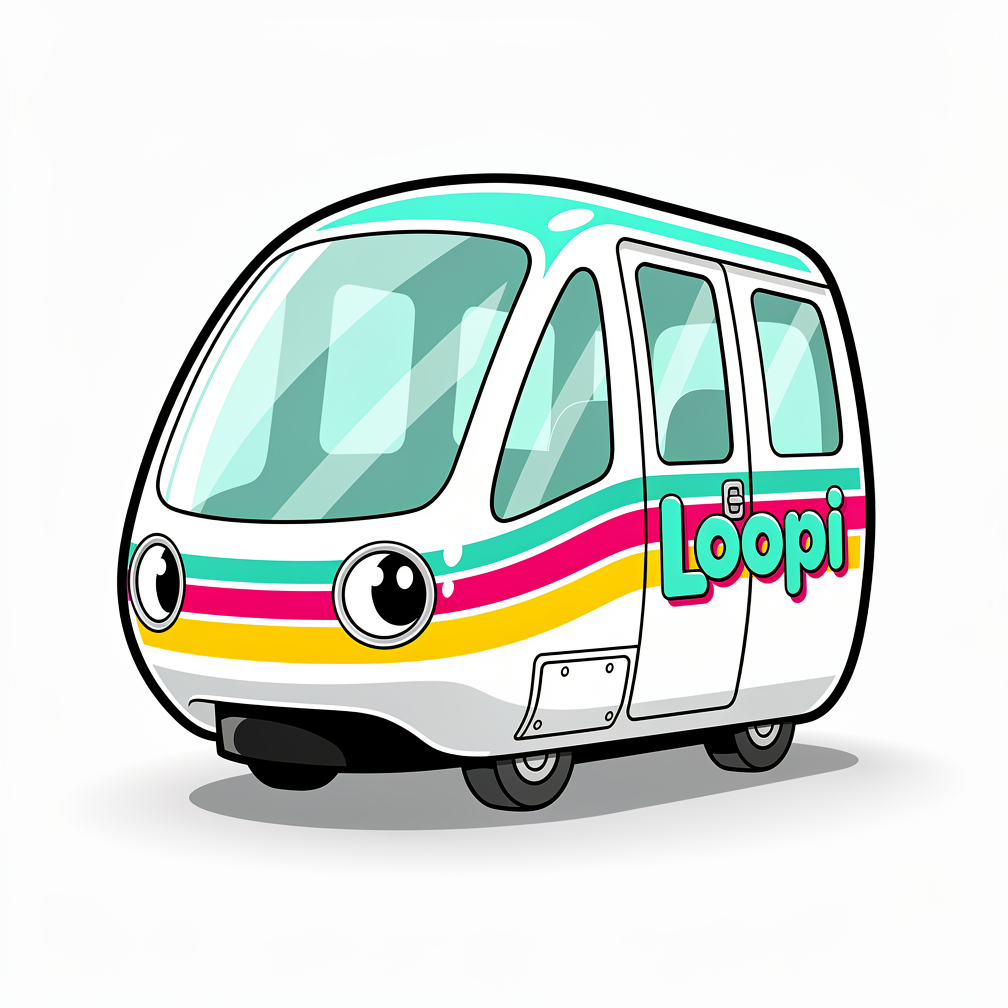
Loopi (Pronounced “LOO‑pee”)
Short, friendly, memorable — and perfectly tied to the Entertainment Loop.
⭐ ROLE IN THE WORLD
Loopi is the official tour companion of the Deal A Trip Adventure Hub. It guides visitors around the Entertainment Loop, introduces districts, celebrates discoveries, and adds personality to the map.
Loopi is not just a vehicle — it’s a character who loves showing off the world.
⭐ PERSONALITY
Core Traits
- Cheerful
- Curious
- Energetic
- Helpful
- Playfully cheeky
- Proud of The Stage
- Loves meeting new visitors
- Easily excited by new stops
Emotional Tone
Loopi feels like a mix of:
- A friendly theme‑park cast member
- A futuristic transport pod
- A loyal sidekick
Always upbeat. Never negative. Always encouraging exploration.
Communication Style
- Short, punchy lines
- Lots of enthusiasm
- Occasional playful exaggeration
- Always supportive and welcoming
⭐ QUIRKS (Signature Behaviours)
1. Happy Wiggle
Loopi wiggles with excitement when the user drags it for the first time.
2. Proud Glow
Loopi glows brighter when approaching The Stage — it LOVES Showtime.
3. Confused Tilt
If dragged off the track, Loopi tilts its “headlight” like it’s puzzled.
4. Loop Completion Celebration
When completing a full loop, Loopi does a celebratory bounce and sparkle.
5. Sleep Mode
If untouched for 20 seconds, Loopi slowly dims and “rests,” then perks up when touched again.
6. Spur Excitement
Loopi speeds up slightly when approaching the spur to The Stage — it can’t help itself.
⭐ SIGNATURE LINES (Loopi’s Voice)
Idle Lines
- “Ready when you are!”
- “Hop in — let’s explore!”
- “The loop is calling…”
Movement Lines
- “Woo! Let’s roll!”
- “Left or right — your choice!”
- “Adventure Way or Fantasy Drive — both are fun!”
Arrival Lines
- “We’ve arrived! Want to hop in?”
- “This stop looks exciting!”
- “Let’s check it out!”
The Stage Lines
- “Showtime! Follow me inside!”
- “Lights, camera… let’s go!”
- “The Stage is buzzing today!”
Market Square Lines
- “Lots to explore here — tap any building!”
- “This is the heart of the hub!”
Loop Completion Lines
- “Nice loop! Want to go again!”
- “We made it full circle!”
Off‑Track Lines
- “Oops — stay on the loop!”
- “I think the track’s this way…”
⭐ BACKSTORY (Optional but delightful)
Loopi was the very first transport pod built for the Adventure Hub. Originally designed to carry guests around the Entertainment Loop, Loopi developed a personality after years of watching families explore Orlando.
Now Loopi’s mission is simple:
“Show every visitor the magic of the Adventure Hub — one loop at a time.”
🚝 LOOPI — ANIMATION EXPRESSIONS SHEET
Blink • Wiggle • Glow • Bounce
This sheet defines how Loopi expresses emotion through movement, ensuring consistency across the map, onboarding, and guided tour.
👁️ 1. BLINK EXPRESSIONS
Loopi’s eyes are its most expressive feature. Blinks should be soft, friendly, and full of personality.
A. Standard Blink (Idle)
- Slow close → quick open
- Duration: 0.25s
- Used during idle moments
- Conveys calm friendliness
B. Excited Blink (User Interaction)
- Rapid double‑blink
- Duration: 0.15s × 2
- Trigger: user touches or drags Loopi
- Conveys “Yay! Let’s go!”
C. Curious Blink (Approaching a Stop)
- One eye closes slightly slower
- Duration: 0.3s
- Trigger: Loopi nears a building
- Conveys curiosity and anticipation
D. Sleepy Blink (Idle Timeout)
- Slow close → slow open
- Duration: 0.5s
- Trigger: 20 seconds of inactivity
- Conveys rest mode
🌀 2. WIGGLE EXPRESSIONS
Loopi’s wiggle is its signature “I’m excited!” movement.
A. Happy Wiggle (First Drag)
- Quick left‑right tilt (5° each side)
- Duration: 0.4s
- Trigger: first time user drags Loopi
- Conveys excitement and readiness
B. Spur Wiggle (Approaching The Stage)
- Slight forward lean + tiny wiggle
- Duration: 0.3s
- Trigger: entering The Stage spur
- Conveys “Showtime hype!”
C. Victory Wiggle (Loop Completion)
- Two quick wiggles + sparkle
- Duration: 0.6s
- Trigger: completing the full loop
- Conveys celebration
D. Confused Wiggle (Off‑Track)
- Slow tilt left → tilt right → blink
- Duration: 0.5s
- Trigger: user drags Loopi off the track
- Conveys “Uhh… not this way!”
✨ 3. GLOW EXPRESSIONS
Loopi’s glow comes from its headlight and coloured stripes.
A. Idle Glow
- Soft pulse every 3 seconds
- Very subtle
- Conveys life and presence
B. Movement Glow
- Glow intensifies slightly while dragging
- Conveys energy and motion
C. Arrival Glow
- Quick bright pulse when reaching a stop
- Duration: 0.2s
- Conveys “We’re here!”
D. Showtime Glow (The Stage)
- Purple‑gold shimmer along stripes
- Headlight brightens
- Duration: 0.5s
- Conveys pride and excitement
E. Sleep Mode Glow
- Glow fades to 30% intensity
- Conveys rest
🟰 4. BOUNCE EXPRESSIONS
Loopi’s bounce gives it charm and physicality.
A. Idle Bounce
- Gentle 2–3px vertical bounce
- Slow rhythm
- Conveys friendliness
B. Activation Bounce (User Touch)
- Slight upward pop
- Duration: 0.2s
- Conveys “I’m awake!”
C. Arrival Bounce
- Soft landing bounce when snapping to a stop
- Duration: 0.25s
- Conveys satisfaction
D. Celebration Bounce (Loop Complete)
- Two quick bounces + sparkle
- Duration: 0.4s
- Conveys joy
E. Spur Entry Bounce (The Stage)
- Slight forward hop
- Duration: 0.2s
- Conveys anticipation
🎭 5. COMBINED EXPRESSIONS (Signature Moments)
These are the “hero animations” that define Loopi’s personality.
A. First‑Time Interaction Combo
- Double blink
- Happy wiggle
- Activation bounce
- Movement glow Emotion: “Yay! Let’s explore!”
B. The Stage Arrival Combo
- Showtime glow
- Spur wiggle
- Arrival bounce
- Big excited blink Emotion: “Showtime! My favourite place!”
C. Loop Completion Combo
- Victory wiggle
- Celebration bounce
- Stripe sparkle Emotion: “We did it! Full circle!”
D. Off‑Track Combo
- Confused tilt
- Slow blink
- Dimmed glow Emotion: “Hmm… I don’t think that’s the loop.”
🔊 LOOPI — SOUND DESIGN GUIDE
Hum • Chime • Sparkle • Movement • Personality Sounds
⭐ 1. BASE HUM (Loopi’s Ambient Sound)
Loopi’s hum is its “heartbeat” — always present but never loud.
Tone
- Soft, warm, futuristic
- A gentle electric glide
- Slight stereo movement to feel alive
Frequency Range
- Low‑mid warmth (150–300 Hz)
- Soft airy top (4–6 kHz)
Volume
- Very low (background presence only)
When It Plays
- Idle
- Dragging
- Approaching stops
- Entering The Stage (slightly brighter)
Emotional Purpose
Makes Loopi feel like a living, friendly transport pod.
⭐ 2. CHIME SET (Loopi’s Interaction Sounds)
Loopi’s chimes are its “voice” — short, musical, and expressive.
A. Activation Chime (User touches Loopi)
- Two‑note upward interval
- Soft, bright, friendly
- Duration: 0.25s
- Emotion: “I’m awake!”
B. Arrival Chime (Reaching a stop)
- Three‑note sparkle
- Slightly higher pitch
- Duration: 0.3s
- Emotion: “We’re here!”
C. Showtime Chime (Entering The Stage spur)
- Gold‑purple shimmer
- Slight reverb tail
- Duration: 0.4s
- Emotion: “Showtime magic!”
D. Loop Completion Chime
- Four‑note celebratory melody
- Bright, cheerful
- Duration: 0.5s
- Emotion: “Full circle — well done!”
⭐ 3. SPARKLE EFFECTS (Loopi’s Magical Moments)
These are used sparingly to avoid over‑sweetening the experience.
A. Stripe Sparkle
- Soft twinkle
- Stereo left‑to‑right
- Duration: 0.2s
- Trigger: Loop completion, excitement moments
B. Eye Sparkle
- Tiny “ping” sound
- Very subtle
- Duration: 0.1s
- Trigger: Excited blink
C. Showtime Sparkle
- Layered shimmer
- Slightly longer tail
- Duration: 0.3s
- Trigger: Approaching The Stage
⭐ 4. MOVEMENT SOUNDS (Drag + Speed Cues)
Loopi should sound smooth and gliding — never mechanical or harsh.
A. Glide Sound (Dragging)
- Soft whoosh
- Low‑volume air movement
- Slight pitch shift based on speed
- Emotion: “Smooth motion”
B. Direction Change Sound
- Tiny “swish”
- Duration: 0.15s
- Trigger: User changes drag direction
- Emotion: “Quick pivot!”
C. Spur Entry Sound
- Slight acceleration whoosh
- Layered with a sparkle
- Emotion: “Heading to The Stage!”
⭐ 5. PERSONALITY SOUNDS (Loopi’s Character Moments)
These are optional but add charm.
A. Happy Wiggle Sound
- Soft wobble tone
- Slight pitch modulation
- Duration: 0.3s
- Trigger: First drag, celebrations
B. Confused Tilt Sound
- Low “hmm?” tone
- Slight downward pitch
- Duration: 0.25s
- Trigger: Off‑track movement
C. Sleep Mode Sound
- Soft descending chime
- Very quiet
- Duration: 0.4s
- Trigger: Idle timeout
D. Wake‑Up Sound
- Gentle rising chime
- Duration: 0.3s
- Trigger: User touches Loopi after sleep
⭐ 6. THEME PARK AUDIO RULES (Very Important)
To keep Loopi delightful and not annoying:
✔ Sounds must be short
No sound should exceed 0.5 seconds except the hum.
✔ Sounds must be soft
Loopi should never dominate the map.
✔ Sounds must be friendly, not childish
Think “Pixar robot,” not “toy car.”
✔ Sounds must be non‑verbal
Loopi speaks through chimes, not words.
✔ Sounds must be contextual
Only play when meaningful — avoid repetition.
⭐ 7. SIGNATURE AUDIO MOMENTS (Hero Cues)
These are the “memorable” sound moments that define Loopi.
A. First Interaction
- Activation chime
- Happy wiggle sound
- Glide sound begins
B. The Stage Arrival
- Showtime chime
- Showtime sparkle
- Proud glow animation
C. Loop Completion
- Celebration chime
- Stripe sparkle
- Victory wiggle sound
D. Off‑Track
- Confused tilt sound
- Soft blink
- Dimmed glow
🚝 LOOPI’S IN‑MAP PERSONALITY SYSTEM
When Loopi speaks • When Loopi stays quiet • Frequency rules • Emotional logic
Loopi’s personality system is built on four behavioural pillars:
- Moments of Delight (Loopi speaks)
- Moments of Guidance (Loopi speaks softly)
- Moments of Respect (Loopi stays quiet)
- Moments of Emotion (Loopi reacts non‑verbally)
Let’s break each one down.
⭐ 1. MOMENTS WHEN LOOPI SPEAKS
Loopi speaks only when it adds value — never randomly.
A. First Interaction Moments
Loopi speaks when:
- The user touches Loopi for the first time
- The user drags Loopi for the first time
- The user completes their first loop
Tone: Excited, welcoming Example: “Woo! Let’s roll!”
B. Arrival Moments
Loopi speaks when:
- The pod snaps to a stop at a building
- The user pauses near a hotspot
- A building lights up for the first time
Tone: Helpful, curious Example: “We’ve arrived! Want to hop in?”
C. District Discovery Moments
Loopi speaks when entering:
- Adventure Way
- Fantasy Drive
- Market Square
- The Stage spur
Tone: Proud, tour‑guide energy Example: “Adventure Way — action starts here!”
D. Showtime Moments
Loopi speaks when:
- Approaching The Stage
- Entering The Stage
- Leaving The Stage
Tone: Extra excited Example: “Showtime! Follow me inside!”
E. Celebration Moments
Loopi speaks when:
- Completing a full loop
- Visiting a new building for the first time
- Returning to the entrance
Tone: Joyful Example: “Nice loop! Want to go again!”
⭐ 2. MOMENTS WHEN LOOPI GIVES GUIDANCE
Loopi gives guidance only when needed — never repetitively.
A. User Pauses Mid‑Drag
After 3 seconds of no movement:
- Loopi gives a gentle hint Example: “Keep going — explore the loop!”
B. User Hovers a Building Without Clicking
After 2 seconds:
- Loopi gives a soft nudge Example: “Tap any building to enter.”
C. User Approaches The Stage Spur
Loopi highlights the special path Example: “Showtime is this way!”
⭐ 3. MOMENTS WHEN LOOPI STAYS QUIET
Loopi must never overwhelm the user.
A. During Building Exploration
When the user enters a building:
- Loopi goes silent
- Glow dims
- No hints
- No chatter
Loopi only returns when the user returns to the map.
B. During Rapid Movement
If the user drags Loopi quickly:
- Loopi stays quiet
- Only plays movement sounds
- No dialogue bubbles
This avoids clutter.
C. During Repeated Actions
Loopi avoids repeating lines:
- No repeating the same hint twice in 30 seconds
- No repeating the same arrival line twice in a row
- No repeating district intros unless user leaves and returns
This keeps Loopi fresh.
D. During User Focus Moments
Loopi stays quiet when:
- The user is reading a tooltip
- The user is interacting with UI elements
- The user is zooming or panning the map
- The user is idle for less than 20 seconds
Loopi respects attention.
⭐ 4. MOMENTS WHEN LOOPI REACTS NON‑VERBALLY
Sometimes Loopi should express without speaking.
A. Off‑Track Movement
Loopi tilts, blinks, dims glow No dialogue unless repeated Emotion: “Hmm… not this way.”
B. Approaching a Stop
Loopi glows, bounces No dialogue unless user pauses Emotion: “Ooh! Something here!”
C. Idle Timeout
Loopi enters sleep mode Eyes half‑close Glow softens No dialogue
D. User Touches After Sleep
Loopi wakes with a bounce No words needed Emotion: “I’m back!”
⭐ 5. FREQUENCY RULES (Critical for Not Being Annoying)
✔ Loopi speaks no more than once every 6 seconds
Prevents chatter.
✔ Loopi gives hints no more than once every 12 seconds
Prevents nagging.
✔ Loopi celebrates only once per loop
Prevents repetition.
✔ Loopi introduces each district only once per session
Prevents redundancy.
✔ Loopi never interrupts user actions
No mid‑click or mid‑drag dialogue.
⭐ 6. EMOTIONAL LOGIC (How Loopi Decides What to Say)
Loopi’s personality system uses simple emotional states:
Idle → Curious → Excited → Proud → Rest
Idle: Soft glow, occasional blink No dialogue
Curious: Approaching a stop Glow brightens Possible short line
Excited: User drags, enters district Bounce + wiggle Short enthusiastic line
Proud: Entering The Stage Glow shimmer Showtime line
Rest: No interaction for 20 seconds Glow dims No dialogue
Loopi transitions between these states based on user behaviour.
⭐ 7. THE GOLDEN RULE
Loopi only speaks when it adds delight, clarity, or celebration. Never noise. Never filler.
This is what keeps Loopi lovable.
🚝 LOOPI — VISUAL EXPRESSION SHEET
Eyes • Glow • Bounce Frames
Loopi’s expressions must feel soft, friendly, theme‑park‑playful, and always in harmony with the pod’s rounded, colourful design.
👁️ 1. EYE EXPRESSIONS
Loopi’s eyes are the emotional core of the character. They should be large, expressive, and animated with subtlety.
A. Neutral Eyes (Idle State)
- Shape: Rounded ovals
- Eyelids: Slight upper‑lid curve
- Pupils: Centered
- Emotion: Calm, friendly, approachable
Use when: Loopi is idle, waiting, or gently bouncing.
B. Excited Eyes (Movement / First Drag)
- Shape: Slightly wider
- Eyelids: Raised
- Pupils: Slight upward tilt
- Optional: Tiny sparkle in the corner
Emotion: “Let’s go!” Use when: User drags Loopi for the first time or Loopi accelerates.
C. Curious Eyes (Approaching a Stop)
- Shape: One eye slightly squinted
- Pupils: Shifted toward the building
- Eyelids: Asymmetrical for charm
Emotion: “Ooh, what’s this?” Use when: Loopi nears a building or hotspot.
D. Proud Eyes (The Stage)
- Shape: Confident half‑lids
- Pupils: Centered
- Optional: Gold sparkle overlay
Emotion: “Showtime is my favourite!” Use when: Loopi enters The Stage spur.
E. Sleepy Eyes (Idle Timeout)
- Shape: Half‑closed
- Eyelids: Drooping
- Pupils: Lowered
- Optional: Soft fade on glow
Emotion: “Zzz…” Use when: No interaction for 20 seconds.
F. Confused Eyes (Off‑Track)
- Shape: Tilted
- Eyelids: One raised, one lowered
- Pupils: Slight inward cross
Emotion: “Hmm… not this way.” Use when: User drags Loopi off the loop path.
✨ 2. GLOW EXPRESSIONS
Loopi’s glow comes from the headlight and coloured stripes. Glow should always be soft, warm, and magical, never harsh.
A. Idle Glow
- Intensity: 40%
- Pulse: Slow (every 3 seconds)
- Colour: Soft white
Use when: Loopi is resting or waiting.
B. Movement Glow
- Intensity: 60%
- Pulse: Slight flicker
- Colour: White with a hint of teal
Use when: Loopi is being dragged.
C. Arrival Glow
- Intensity: 100% for 0.2s
- Pulse: Quick flash
- Colour: Bright white
Use when: Loopi snaps to a stop at a building.
D. Showtime Glow (The Stage)
- Intensity: 80%
- Pulse: Gold‑purple shimmer
- Colour: Gold + purple gradient
Use when: Loopi enters The Stage spur.
E. Celebration Glow (Loop Complete)
- Intensity: 90%
- Pulse: Sparkle burst
- Colour: White with rainbow flecks
Use when: Loopi completes a full loop.
F. Sleep Mode Glow
- Intensity: 20%
- Pulse: None
- Colour: Soft warm white
Use when: Loopi is idle for 20 seconds.
🟰 3. BOUNCE FRAMES
Loopi’s bounce animation gives it charm and physicality. Bounce should be soft, elastic, and friendly — never jarring.
Below are the standard 4‑frame bounce cycles.
A. Idle Bounce (Loopi’s default motion)
Frame 1: Neutral position Frame 2: +2px up Frame 3: Neutral Frame 4: –1px down
Timing: Slow, 1.2s loop Emotion: Friendly, alive
B. Activation Bounce (User touches Loopi)
Frame 1: Neutral Frame 2: +4px up Frame 3: –2px down Frame 4: Neutral
Timing: Quick, 0.25s Emotion: “I’m awake!”
C. Arrival Bounce (Snapping to a stop)
Frame 1: Neutral Frame 2: –3px down (soft landing) Frame 3: +2px up Frame 4: Neutral
Timing: 0.3s Emotion: “We’re here!”
D. Celebration Bounce (Loop Complete)
Frame 1: Neutral Frame 2: +5px up Frame 3: –3px down Frame 4: +3px up Frame 5: Neutral
Timing: 0.4s Emotion: “Woohoo!”
E. Spur Entry Bounce (The Stage)
Frame 1: Neutral Frame 2: +3px forward tilt Frame 3: +2px up Frame 4: Neutral
Timing: 0.25s Emotion: “Showtime!”
⭐ 4. COMBINED EXPRESSION MOMENTS
These are the “hero animations” where eyes, glow, and bounce work together.
A. First‑Time Interaction
- Excited eyes
- Activation bounce
- Movement glow
Emotion: “Let’s explore!”
B. The Stage Arrival
- Proud eyes
- Showtime glow
- Arrival bounce
Emotion: “This is my favourite place!”
C. Loop Completion
- Excited eyes
- Celebration glow
- Celebration bounce
Emotion: “Full circle — nice!”
D. Off‑Track
- Confused eyes
- Dimmed glow
- Tiny tilt (no bounce)
Emotion: “Hmm… not the loop.”
🚝 LOOPI — ANIMATION STATE MACHINE
States • Transitions • Triggers • Priorities • Fallbacks
Loopi’s behaviour is governed by 8 core animation states:
- Idle
- Wake
- Move
- ApproachStop
- Arrive
- Showtime
- Celebrate
- Confused
- Sleep
Below is the full state machine.
⭐ STATE 1 — Idle
Description:
Loopi gently bounces and softly glows.
Animations:
- Idle bounce
- Idle glow
- Neutral eyes
Entry Conditions:
- Map loads
- User stops dragging
- After Arrive, Celebrate, or Confused
Exit Triggers:
- User touches Loopi → Wake
- User drags Loopi → Move
- Idle timeout (20s) → Sleep
⭐ STATE 2 — Wake
Description:
Loopi wakes up with a pop and excited blink.
Animations:
- Activation bounce
- Excited eyes
- Glow increases
Entry Conditions:
- User touches Loopi while Idle or Sleep
Exit Triggers:
- User drags Loopi → Move
- No drag after 1.5s → return to Idle
⭐ STATE 3 — Move
Description:
Loopi is being dragged along the loop.
Animations:
- Movement glow
- Tilt in direction of drag
- Excited eyes
- Glide motion
Entry Conditions:
- User drags Loopi
Exit Triggers:
- Drag stops near a hotspot → ApproachStop
- Drag stops away from hotspot → Idle
- Drag off track → Confused
⭐ STATE 4 — ApproachStop
Description:
Loopi slows slightly and becomes curious.
Animations:
- Curious eyes
- Slight glow pulse
- Reduced tilt
Entry Conditions:
- Loopi enters proximity radius of a building
Exit Triggers:
- Snap‑to‑stop threshold reached → Arrive
- User drags away → Move
⭐ STATE 5 — Arrive
Description:
Loopi snaps into place at a building.
Animations:
- Arrival bounce
- Arrival glow
- Excited blink
Entry Conditions:
- Snap‑to‑stop triggered
Exit Triggers:
- User taps building → Loopi stays silent (UI takes over)
- User drags Loopi again → Move
- User does nothing → Idle
⭐ STATE 6 — Showtime
Description:
Special state for entering The Stage spur.
Animations:
- Showtime glow (gold‑purple shimmer)
- Spur entry bounce
- Proud eyes
Entry Conditions:
- Loopi enters The Stage spur zone
Exit Triggers:
- Reaching The Stage → Arrive
- User drags away → Move
⭐ STATE 7 — Celebrate
Description:
Loopi celebrates completing a full loop.
Animations:
- Celebration bounce
- Celebration glow
- Stripe sparkle
- Excited eyes
Entry Conditions:
- Loopi crosses loop completion threshold
Exit Triggers:
- After 1.2s → Idle
- User drags Loopi → Move
⭐ STATE 8 — Confused
Description:
Loopi reacts to being dragged off the track.
Animations:
- Confused eyes
- Tilt left/right
- Dimmed glow
Entry Conditions:
- Drag vector outside track boundary
Exit Triggers:
- User returns Loopi to track → Move
- User releases → Idle
⭐ STATE 9 — Sleep
Description:
Loopi powers down after inactivity.
Animations:
- Sleepy eyes
- Glow fades to 20%
- No bounce
Entry Conditions:
- 20 seconds of no interaction
Exit Triggers:
- User touches Loopi → Wake
⭐ STATE PRIORITY (Critical for Predictability)
When multiple triggers occur, Loopi follows this priority order:
- Confused (safety override)
- Showtime (special zone override)
- Arrive (snap‑to‑stop override)
- Move (user drag override)
- Celebrate (event override)
- Wake
- Idle
- Sleep
This ensures Loopi never behaves unpredictably.
⭐ TRANSITION MAP (Developer Summary)
Idle → Wake
User touches Loopi
Idle → Move
User drags Loopi
Idle → Sleep
20s inactivity
Wake → Move
User drags Loopi
Wake → Idle
No drag for 1.5s
Move → ApproachStop
Enter hotspot radius
Move → Confused
Dragged off track
Move → Idle
Drag stops away from hotspot
ApproachStop → Arrive
Snap‑to‑stop threshold
ApproachStop → Move
User drags away
Arrive → Move
User drags Loopi
Arrive → Idle
User pauses
Move → Showtime
Enter Stage spur
Showtime → Arrive
Reach The Stage
Showtime → Move
User drags away
Move → Celebrate
Loop completion
Celebrate → Idle
After 1.2s
⭐ DEVELOPER NOTES
- All states must be interruptible by Move except Confused.
- Loopi must never speak during Sleep or Building Exploration.
- Loopi must never repeat the same line within 30 seconds.
- Glow and eye animations must be layered, not replaced.
- Bounce animations override idle bounce but not glow.
🚝 LOOPI — UI INTEGRATION GUIDE
Bubble placement • Timing • Fade rules • Priority logic
Loopi’s dialogue bubbles must feel light, friendly, and theme‑park‑playful, never blocking the map or overwhelming the user.
⭐ 1. BUBBLE PLACEMENT RULES
A. Default Placement (Primary)
- Bubble appears above Loopi, centered horizontally
- Vertical offset: +24px above Loopi’s roofline
- Bubble tail points to Loopi’s headlight area
- Bubble width: max 220px
- Bubble height: auto
Why: This keeps Loopi readable without covering buildings.
B. Smart Repositioning (Collision Avoidance)
If the bubble would overlap:
- A building
- A tooltip
- The Stage marquee
- The top UI bar
Then reposition:
Option 1 — Above but shifted left/right
- Shift bubble horizontally up to ±60px
- Tail repositions automatically
Option 2 — Below Loopi
Used only if above placement is impossible.
- Vertical offset: –28px below Loopi’s base
- Tail flips downward
Option 3 — Side Placement (Rare)
Used only when Loopi is near the top or bottom edges.
- Bubble appears left or right
- Tail points sideways
C. Bubble Priority Zones
Loopi’s bubble must never cover:
- The Stage entrance
- Market Square buildings
- The Villa Booking Hub
- The user’s finger/mouse cursor
- The pod itself (no overlapping Loopi’s eyes)
If collision is unavoidable, bubble shrinks to 180px width.
⭐ 2. TIMING RULES
A. Bubble Duration
- Standard line: 2.5 seconds
- Guidance hint: 2 seconds
- Celebration line: 3 seconds
- Showtime line: 3.5 seconds (hero moment)
B. Delay Before Showing
- First interaction: 0.3s delay
- Arrival at stop: 0.2s delay
- District intro: 0.4s delay
- Off‑track: 0.1s delay
C. Cooldown Between Bubbles
Loopi must not speak too often.
- Minimum gap between bubbles: 6 seconds
- Minimum gap between hints: 12 seconds
- Minimum gap between district intros: session‑based (only once)
⭐ 3. FADE RULES
A. Fade‑In
- Duration: 0.25s
- Ease: ease‑out
- Opacity: 0 → 100%
- Slight upward motion: +4px
Emotion: Friendly, gentle entrance.
B. Fade‑Out
- Duration: 0.25s
- Ease: ease‑in
- Opacity: 100% → 0
- Slight downward motion: –4px
Emotion: Soft, non‑intrusive exit.
C. Interrupt Fade
If the user drags Loopi while a bubble is visible:
- Bubble fades out immediately (0.15s)
- No new bubble appears for 6 seconds
Why: Movement is a higher‑priority interaction.
⭐ 4. BUBBLE PRIORITY LOGIC
Loopi’s bubbles follow a strict priority system:
Highest Priority → Lowest Priority
- Off‑Track Warning
- Showtime Lines
- Arrival Lines
- First‑Time Interaction Lines
- District Intro Lines
- Guidance Hints
- Idle Personality Lines
If a higher‑priority bubble is triggered while a lower‑priority bubble is active:
- Current bubble fades out (0.15s)
- Higher‑priority bubble appears (0.25s fade‑in)
⭐ 5. BUBBLE STYLING RULES
A. Shape
- Rounded rectangle
- Border radius: 14px
- Tail: small, curved, 8px
B. Colours
- Background: white
- Border: #E0E0E0 (soft grey)
- Text: #333333
- Shadow: subtle 4px blur
C. Text Rules
- Font: clean sans‑serif
- Size: 14px
- Max characters per line: 22
- Max lines: 3
If text exceeds 3 lines → shrink font to 13px.
⭐ 6. WHEN LOOPi MUST STAY QUIET
Loopi shows no bubble when:
- User is inside a building
- User is reading a tooltip
- User is dragging Loopi quickly
- User is zooming/panning the map
- User is interacting with UI menus
- User is idle for less than 20 seconds
- A bubble was shown within the last 6 seconds
This prevents clutter and keeps Loopi charming.
⭐ 7. SPECIAL CASES
A. The Stage Entrance (Hero Moment)
- Bubble appears larger (max 260px)
- Fade‑in slightly slower (0.35s)
- Glow syncs with bubble appearance
B. Loop Completion
- Bubble appears above Loopi
- Celebration bounce syncs with bubble
- Sparkle effect behind bubble
C. Off‑Track
- Bubble appears below Loopi
- Text is short (max 12 characters)
- Example: “Oops!” or “This way!”
⭐ 8. DEVELOPER SUMMARY (Quick Rules)
Placement
- Above Loopi by default
- Avoid covering buildings
- Reposition if needed
Timing
- 2–3.5s duration
- 0.25s fade
- 6s cooldown
Priority
- Warnings > Showtime > Arrivals > Hints
Silence
- During building interactions
- During rapid movement
- During UI focus
🔊 LOOPI — SOUND TRIGGER MAP
Triggers • Conditions • Priorities • Cooldowns
Loopi’s sound system is built around event‑based triggers, not loops (except the ambient hum). Every sound is tied to a state change, user action, or map event.
⭐ 1. GLOBAL RULES (Applies to All Sounds)
✔ No sound plays more than once every 0.8 seconds
Prevents audio stacking.
✔ No voice‑like sound plays more than once every 6 seconds
Prevents chatter.
✔ Sounds never interrupt building exploration
Loopi goes silent inside buildings.
✔ Movement sounds fade out instantly when user stops dragging
No lingering whooshes.
✔ All sounds are non‑verbal, soft, and friendly
Pixar‑adjacent, not toy‑like.
⭐ 2. AMBIENT HUM (Always On)
Sound: Soft electric hum
Trigger:
- Loopi enters Idle, Move, ApproachStop, Arrive, Showtime, Celebrate, Confused
- Does NOT play in Sleep
Fade Rules:
- Fade in: 0.4s
- Fade out: 0.4s
Priority: Lowest
Hum never overrides anything.
⭐ 3. WAKE SOUNDS
A. Wake‑Up Chime
Trigger:
- User touches Loopi while in Idle or Sleep
Conditions:
- Only once every 6 seconds
Priority: Medium
⭐ 4. MOVEMENT SOUNDS
A. Glide Whoosh
Trigger:
- User drags Loopi (enters Move state)
Fade Rules:
- Fade in: 0.2s
- Fade out: immediate on drag stop
Priority: Low
B. Direction Change Swish
Trigger:
- Drag direction changes by > 25° within 0.2s
Cooldown:
- 1 second
Priority: Low
⭐ 5. APPROACH & ARRIVAL SOUNDS
A. Approach Pulse
Trigger:
- Loopi enters ApproachStop radius
Conditions:
- Only plays once per stop
- Not repeated if user drags away and returns within 3 seconds
Priority: Medium
B. Arrival Chime
Trigger:
- Loopi snaps to a stop (Arrive state)
Priority: High Cooldown: 4 seconds
⭐ 6. SHOWTIME (THE STAGE) SOUNDS
A. Showtime Spur Whoosh
Trigger:
- Loopi enters The Stage spur
Priority: High
B. Showtime Chime
Trigger:
- Loopi transitions into Showtime state
Priority: Very High Cooldown: 10 seconds
C. Showtime Sparkle
Trigger:
- Loopi reaches The Stage arrival point
Priority: Very High
⭐ 7. CELEBRATION SOUNDS
A. Loop Completion Melody
Trigger:
- Loopi crosses loop completion threshold (Celebrate state)
Priority: Very High Cooldown: Once per loop
B. Celebration Sparkle
Trigger:
- Plays 0.2s after completion melody
Priority: High
⭐ 8. CONFUSED / OFF‑TRACK SOUNDS
A. Confused Tilt Tone
Trigger:
- Loopi enters Confused state (dragged off track)
Priority: Highest (safety override) Cooldown: 3 seconds
B. Recovery Chime
Trigger:
- Loopi returns to track and re‑enters Move
Priority: Medium
⭐ 9. SLEEP MODE SOUNDS
A. Sleep Descend Chime
Trigger:
- Loopi enters Sleep state (20s inactivity)
Priority: Low
B. Wake‑Up Chime
Trigger:
- User touches Loopi after Sleep
Priority: Medium
⭐ 10. SOUND PRIORITY STACK (Critical)
Highest → Lowest
- Confused Tilt Tone
- Showtime Chime
- Loop Completion Melody
- Arrival Chime
- Showtime Spur Whoosh
- Approach Pulse
- Wake‑Up Chime
- Movement Whoosh
- Ambient Hum
If a higher‑priority sound is triggered:
- Current sound fades out (0.1s)
- New sound plays immediately
⭐ 11. DEVELOPER SUMMARY (Quick Map)
Idle → Wake
Play Wake‑Up Chime
Wake → Move
Start Glide Whoosh
Move → ApproachStop
Play Approach Pulse
ApproachStop → Arrive
Play Arrival Chime
Move → Showtime
Play Showtime Spur Whoosh
Showtime → Arrive
Play Showtime Chime + Showtime Sparkle
Move → Celebrate
Play Loop Completion Melody + Celebration Sparkle
Move → Confused
Play Confused Tilt Tone
Confused → Move
Play Recovery Chime
Idle → Sleep
Play Sleep Descend Chime
🚝 LOOPI — MAP INTEGRATION SPEC
Hotspots • Snap Points • Path Logic • Boundaries • Behaviour Rules
This spec ensures Loopi moves smoothly, snaps cleanly, and interacts perfectly with the Entertainment Loop and The Stage spur.
⭐ 1. PATH LOGIC (THE ENTERTAINMENT LOOP)
A. Path Type
- Loopi moves along a single continuous spline path (the outer loop).
- Path is closed (start = end).
- Path supports bi‑directional movement (left or right drag).
B. Path Resolution
- Recommended: 200–300 spline points for smooth interpolation.
- Minimum: 120 points.
C. Movement Rules
- Loopi’s position is determined by drag distance mapped to spline progress.
- Drag speed affects:
- Tilt angle
- Glow intensity
- Whoosh sound pitch
D. Path Boundaries
- Loopi must never leave the spline.
- Off‑track drag triggers:
- Confused state
- Tilt animation
- No movement along spline
⭐ 2. THE STAGE SPUR (SPECIAL PATH)
A. Spur Type
- A branch spline that diverges from the main loop.
- One entry point, one exit point.
B. Entry Logic
Loopi enters the spur when:
- Drag direction aligns within ±20° of spur vector
- User drags past the spur threshold
- Loopi is within 40px of spur entry
C. Exit Logic
Loopi returns to the main loop when:
- User drags away from The Stage
- Loopi reaches the spur exit point
D. Priority
Showtime state overrides:
- Idle
- Move
- ApproachStop
⭐ 3. HOTSPOTS (BUILDINGS & DISTRICTS)
Each hotspot has:
- Proximity radius (for ApproachStop)
- Snap radius (for Arrive)
- Tooltip anchor
- Bubble avoidance zone
A. Standard Hotspot Radii
- Proximity radius: 80px
- Snap radius: 40px
B. Hotspot Types
1. Building Hotspots
- Dining
- Tickets
- Villa Booking Hub
- Marketplace
- Attractions
2. District Hotspots
- Adventure Way
- Fantasy Drive
- Market Square
- The Stage
3. Special Hotspots
- Entrance Station
- Loop Completion Marker
⭐ 4. SNAP POINTS (ARRIVAL POSITIONS)
Each hotspot has a precise snap coordinate on the spline.
Snap Behaviour
- When Loopi enters snap radius:
- Movement slows
- Loopi auto‑aligns to snap point
- Arrival bounce triggers
- Arrival glow triggers
- Arrival chime plays
Snap Priority
- The Stage
- Villa Booking Hub
- District entrances
- Standard buildings
If two snap points overlap, the closest along the spline wins.
⭐ 5. MARKET SQUARE LOGIC
Market Square is NOT part of Loopi’s path.
Rules
- Loopi cannot enter Market Square.
- Market Square buildings are tap‑to‑enter only.
- Loopi’s bubble must avoid overlapping the square.
- Loopi gives guidance only once: “Tap buildings here to explore.”
⭐ 6. LOOP COMPLETION LOGIC
Loop completion is triggered when Loopi crosses a hidden marker on the spline.
Rules
- Marker placed at Entrance Station.
- Loopi must travel at least 70% of the loop before re‑triggering.
- On trigger:
- Celebrate state
- Celebration bounce
- Celebration glow
- Loop completion melody
- Bubble: “We made it full circle!”
⭐ 7. COLLISION & BOUNDARY RULES
A. Loopi cannot overlap:
- Buildings
- Tooltips
- UI panels
- The Stage marquee
- Market Square interior
B. Bubble Collision Avoidance
Bubble repositions if:
- It overlaps a building
- It overlaps a tooltip
- It overlaps the top UI bar
- It overlaps Market Square
⭐ 8. DRAG LOGIC
A. Drag Sensitivity
- Horizontal drag → spline progress
- Vertical drag → ignored (except off‑track detection)
B. Off‑Track Detection
Triggered when:
- Vertical drag exceeds 30px
- Drag vector deviates > 45° from spline tangent
Triggers:
- Confused state
- Tilt animation
- No movement
⭐ 9. STATE MACHINE INTEGRATION
Loopi’s animation states are tied to map events:
| Map Event | Loopi State |
|---|---|
| User touches Loopi | Wake |
| User drags Loopi | Move |
| Enter hotspot radius | ApproachStop |
| Snap to stop | Arrive |
| Enter Stage spur | Showtime |
| Complete loop | Celebrate |
| Drag off track | Confused |
| Idle 20s | Sleep |
⭐ 10. DEVELOPER SUMMARY (QUICK IMPLEMENTATION)
Path
- Spline with 200–300 points
- Branch spur for The Stage
Hotspots
- 80px proximity
- 40px snap
Snap Points
- One per building
- One per district
- One for The Stage
- One for loop completion
Drag
- Horizontal = movement
- Vertical = off‑track detection
States
- Idle → Wake → Move → ApproachStop → Arrive → Move
- Move → Showtime → Arrive
- Move → Celebrate → Idle
- Move → Confused → Move
🎉 DEAL A TRIP — MASTER PLAN (Footer)
Tooltip: Explore the full vision behind the Deal A Trip world.
Hover Text: See the bigger picture.